If I’m honest, this is one of the questions I ask myself the most as a parent — and one I hear other parents ask all the time: Are we doing this technology thing right?
Am I giving my kids enough access? Or too much? Will they be left out if they don’t have a phone? Do they need more technology to be ready for the future?
When it comes to kids and technology, we’re constantly bombarded with opinions. “They’ll be left out.” “Everyone else has one.” “They need tech skills to succeed.” Some of those statements have truth to them. Our kids absolutely need technology skills. They’re growing up in a digital world, and pretending it doesn’t exist isn’t the answer.
But over the last several years, I’ve realized something. I don’t think culture should be my compass. I think my child should.
Table of Contents
The Moment That Changed My Thinking About Kids and Technology
Last week, my daughter was circling me like a shark. My phone kept lighting up every few seconds. The middle school group chat had exploded.
“Mom… can I just answer one thing?” “I just need the iPad for a minute.”
Five minutes later there were well over 200 messages.
What surprised me wasn’t my daughter’s urgency. It was mine.
Even though my phone was on silent, every notification that flashed across the screen pulled at my attention. I felt distracted. Restless. A little uneasy. And I wasn’t even the one in the group chat.
That made me stop and think. If a few notifications could affect me that quickly, what was my daughter experiencing as the one in the middle of it?
In that moment, I wasn’t asking whether group chats were good or bad. I wasn’t wondering what every other family was doing. I wasn’t even thinking about what she wanted. I was asking a different question: What does she need right now?
Because what our kids want in a moment isn’t always what their developing brain needs. And learning to recognize the difference may be one of the most important parenting skills we ever develop.
The Filter I Use for Kids and Technology
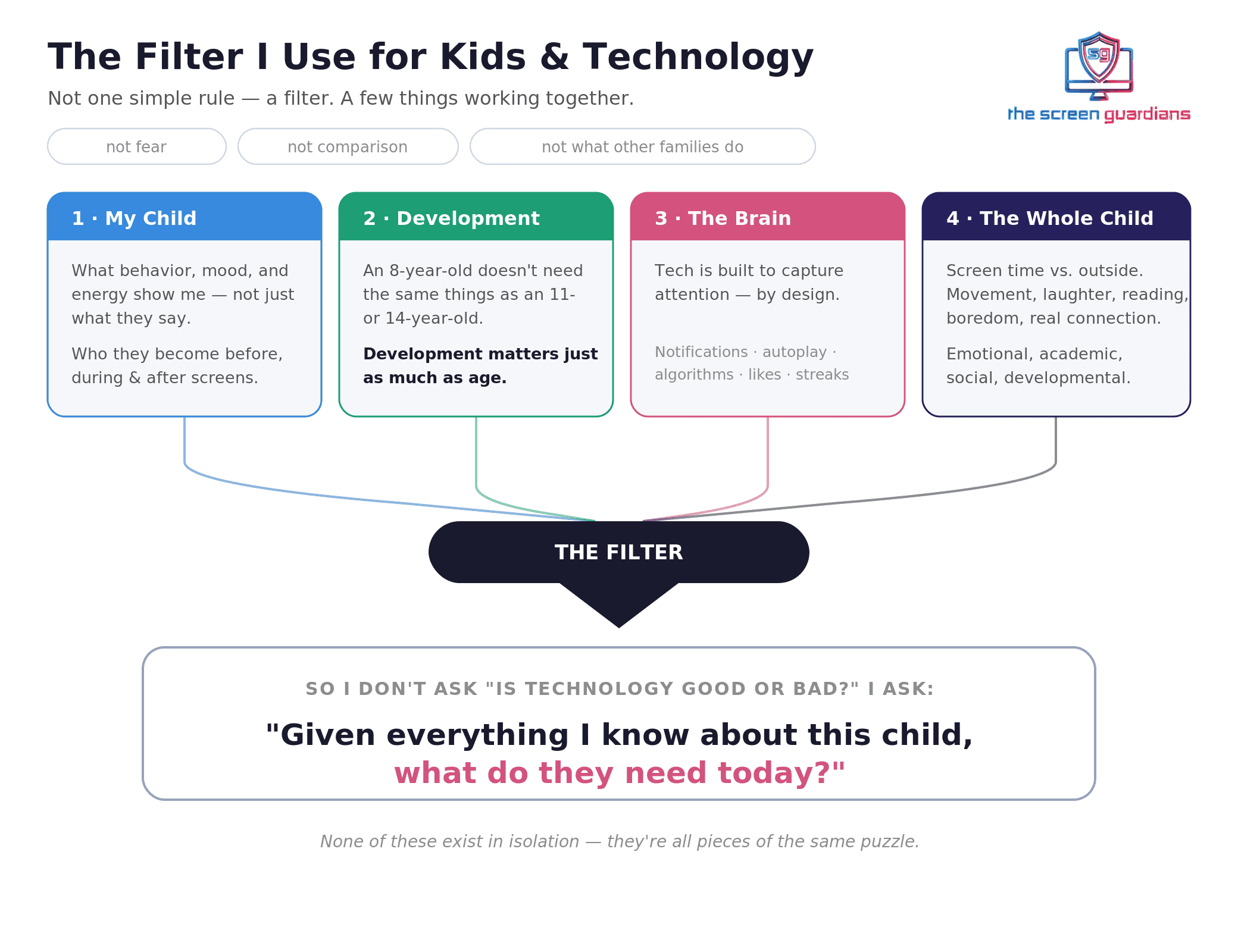
People often ask me how we decide what’s appropriate when it comes to kids and technology. The truth is, I don’t have one simple rule. I have a filter.
That filter isn’t built on fear. It isn’t built on comparison. And it isn’t based solely on what other families are doing. It’s built on a few things working together.
First, I pay attention to my child. Not just what they’re saying, but what they show me through their behavior, their mood, their energy, what captures their attention, and who they become before, during, and after screen time.
Second, I consider what I know about child development. An 8-year-old doesn’t need the same things as an 11-year-old. An 11-year-old doesn’t process technology the same way a 14-year-old does. Development matters just as much as age.
Third, I think about what I know about the brain. Technology isn’t just another toy. It’s one of the most sophisticated attention-capturing tools ever created. Notifications. Autoplay. Algorithms. Likes. Streaks. Recommendations. They’re all intentionally designed to keep us engaged.
Understanding that doesn’t make me afraid of technology. It helps me use it more intentionally. Instead of asking whether my child is strong enough to resist it, I ask whether I’ve given them the developmental skills they’ll need to navigate it wisely.
Finally, I look at the whole child. How much time have they spent on a device today? How much time outside? Have they moved their bodies? Have they laughed? Have they read? Have they been bored? Have they connected with friends or family in real life? How are they doing emotionally, academically, socially, developmentally?
None of those things exist in isolation. They’re all pieces of the same puzzle. That’s why I don’t ask, “Is technology good or bad?” I ask, “Given everything I know about this child, what do they need today?”
Summer Is My Favorite Time to Assess
Summer strips away the routine. Homework disappears. Schedules slow down. There are fewer places to rush. We simply have more chances to watch our kids — not who they’re supposed to be, but who they’re becoming.
Instead of asking, “Are my kids missing out?” I ask, “Are they thriving?” Those are two very different questions.
The Four Areas I Look At
1. Developmental
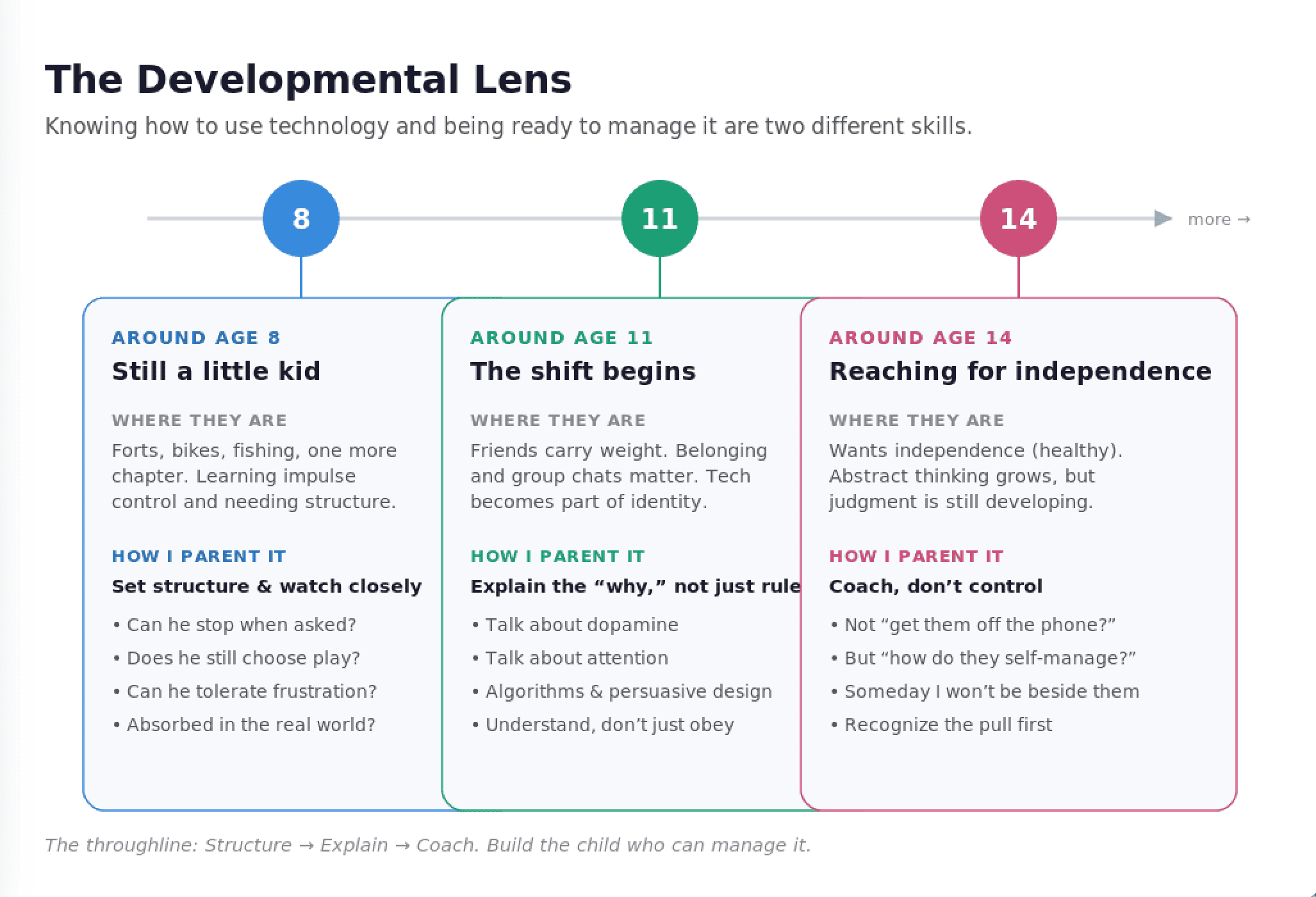
One of the biggest mistakes we make is assuming that because our kids know how to use technology, they’re ready to manage it. Those are two completely different skills.
Around age 8. My youngest still wants to build forts, fish, ride his bike until dark, read another chapter, and somehow eat six meals a day. That’s exactly where I want him developmentally. Could he learn to use social media? Probably. But I don’t think the question is whether he can use it. I ask whether it helps him become more of the little boy he’s becoming — or quietly pulls him away from it.
At this age, kids are still learning impulse control. They need structure. Technology offers instant rewards. So I pay attention. Can he stop when asked? Does he still choose imaginative play? Can he tolerate frustration? Does he still get completely absorbed in the real world?
Around age 11. This is when I start seeing a shift. Friends carry more weight. Belonging matters. Group chats matter. Being included suddenly matters. Technology isn’t just fun anymore — it’s becoming part of identity.
Instead of only setting rules, I start explaining why technology feels so hard to put down. We talk about dopamine. Attention. Algorithms. Persuasive design. I want my kids to understand what’s happening in their brains, not simply obey my rules.
Around age 14. Teenagers naturally want more independence. That’s healthy. They’re capable of more abstract thinking, but the part of the brain responsible for judgment and impulse control is still developing. I’ve found that coaching works better than controlling. Instead of asking, “How do I get them off the phone?” I ask, “How do I help them learn to manage it themselves?” Because someday I won’t be standing beside them. I want them to recognize the pull of technology before it starts managing them.
2. Physical
Sometimes my kids’ bodies tell me everything I need to know. If we’ve been running from birthday parties to baseball games to vacations, and then suddenly my youngest is crying because I cut his sandwich into squares instead of triangles… I don’t automatically think, “He needs more discipline.” I think, “He’s exhausted.”
His nervous system has been running hard. He doesn’t need another activity. He needs rest. He needs outside time. He needs sleep. Sometimes slowing down is exactly what a growing brain needs.
3. Intellectual
This may surprise people, but I actually protect boredom. One afternoon my kids told me they were bored. My first instinct was to offer an activity. Or a screen. Instead I simply said, “Go outside for a while.”
Twenty minutes later they had built an obstacle course for the neighborhood kids. It reminded me of something I often forget: boredom isn’t empty. It’s where creativity begins. Technology fills every quiet moment. Life doesn’t need to. I want my kids to learn they are capable of creating joy — not just consuming it.
4. Social
Middle school has become one of my greatest teachers. When the group chat is exploding and my daughter is asking every few minutes to check the iPad, I’m no longer paying attention only to the number of messages. I’m watching what happens afterward.
Does she become disconnected from the family? Does she seem anxious? Does she pick fights with her brothers? Does she suddenly seem on top of the world because the constant notifications created a rush of excitement? I’ve noticed those emotional highs are often followed by emotional lows.
That’s when we talk. Not with punishment. With curiosity.
- “How are you feeling?”
- “What do you think your brain needs right now?”
- “Did all of those messages actually make you feel more connected?”
Sometimes the answer surprises both of us. Those conversations aren’t just about technology. They’re teaching self-awareness.
What Balance Between Kids and Technology Looks Like in Our House
People often ask me what balance actually looks like. I don’t think balance means equal amounts of screen time and outside time. I think balance means giving my child enough of what their developing brain needs.
Every summer we make bucket lists. Not just places to visit — goals. One child wants to read 50 books. My youngest has a reading chart where he colors in a square every time he reads for 20 minutes. Before we add more entertainment, I want to help them build a life that’s exciting enough to compete with it.
I also pay attention to boredom. Not because I want my kids to be uncomfortable, but because I want them to discover that they can create, imagine, problem-solve, and enjoy life without someone else entertaining them.
One thing I’ve stopped doing is looking at technology in isolation. If we’ve spent the morning hiking, fishing, swimming, laughing around the dinner table, reading, and visiting grandparents, I think about screen time differently than if we’ve spent three straight days moving from one screen to the next. Real life builds the brain in ways technology simply can’t.
That’s why I’m not just asking how much screen time my kids have had. I’m asking: How much life have they lived today?
The Questions I Ask Instead
Instead of asking, “Should my child have a phone?” I ask:
- What is my child needing more of right now?
- What developmental skills are they practicing?
- Is technology expanding their world or shrinking it?
- Can they still tolerate boredom?
- Do they recover after putting technology away?
- Are they excited about life offline?
- Are they becoming more dependent on entertainment, or more capable of creating their own?
- Is technology helping them flourish — or merely keeping them occupied?
Those questions lead me to much better answers than simply counting how many hours they’ve spent on a screen. If you want a research-grounded starting point, the American Academy of Pediatrics offers helpful guidance on family media use that pairs well with this kind of whole-child thinking.
The Question I Keep Coming Back To
At the end of the day, I don’t measure success by how well my kids can use technology. I measure it by whether they’re becoming curious, kind, resilient, connected, healthy, and capable human beings. Technology is simply one tool that can help — or hinder — that journey.
My kids probably won’t remember exactly when they got a phone. They won’t remember what app they downloaded first. But I hope they remember fishing. Reading under blankets. Family dinners. Building forts. Laughing with their siblings. Learning how to sit with boredom until creativity showed up. Learning that technology is an incredible tool — but never the center of a meaningful life.
Because one day they’ll all have phones. They’ll have jobs. They’ll have technology everywhere they turn. What I’m trying to give them now is something much harder to learn later: attention, curiosity, presence, and self-control.
The goal isn’t to raise kids who can use technology. The goal is to raise kids who know when to put it down.
Frequently Asked Questions
Q: How do I decide how much technology my child needs?
A: Start with the child, not the crowd. Look at development and age, watch how your child acts before, during, and after screen time, and consider the whole picture — sleep, movement, mood, real-life connection. Then ask, “Given everything I know about this child, what do they need today?”
Q: At what age should kids and technology mix — when should my child get a phone?
A: There’s no single magic age. A better question than “Is my child old enough?” is “Have I helped my child build the developmental skills to manage this?” Impulse control, boredom tolerance, and self-awareness matter more than a birthday. (More on deciding when your child is ready for a phone.)
Q: Is screen time bad for kids?
A: Screen time isn’t automatically good or bad — it depends on the child, the context, and what it’s replacing. The goal is balance: using technology intentionally rather than impulsively, and making sure real life still fills the day.
Q: How do I know if my child has too much screen time?
A: Watch how they recover when it’s put away. If your child struggles to stop, seems anxious or irritable afterward, stops choosing offline play, or can’t tolerate boredom, those are signals worth paying attention to — not to panic over, but to gently rebalance. Here are practical ways to limit screen time that actually work.
You’re Not Navigating This Alone
If any of this sounds familiar, take a breath — you’re asking exactly the right questions. Raising kids in a digital world was never meant to be a solo job. That’s why we built The Parent Portal: a calm, judgment-free place with real tools, scripts for hard conversations, and support for the moments when screen stress feels overwhelming. Not anti-technology. Pro-child. Start where you are — we’ll walk this road with you.