Screen Guardians Podcast 39 — The Cost of Free, with Ben Gillenwater, the Family IT Guy
How many minutes was she on the tablet today? Is two hours too much? For years, kids screen time has been the number families and schools try to manage. On this episode of the podcast, Ben Gillenwater handed me a better number to watch, and I haven’t stopped thinking about it.
I’ve followed Ben Gillenwater, the Family IT Guy, for a long time. One of his episodes compared screen-time education to the anti-smoking Truth campaign. I saved it and sent it to everyone I knew, because it explained so clearly why education is the greatest form of protection.
Ben used to work with the NSA. He understands how technology works under the covers, and he’s also a dad who openly admits he’s made mistakes. That mix of expertise and honesty is why I think every parent should hear this conversation.
He said one thing that changed how I think about our kids and technology:
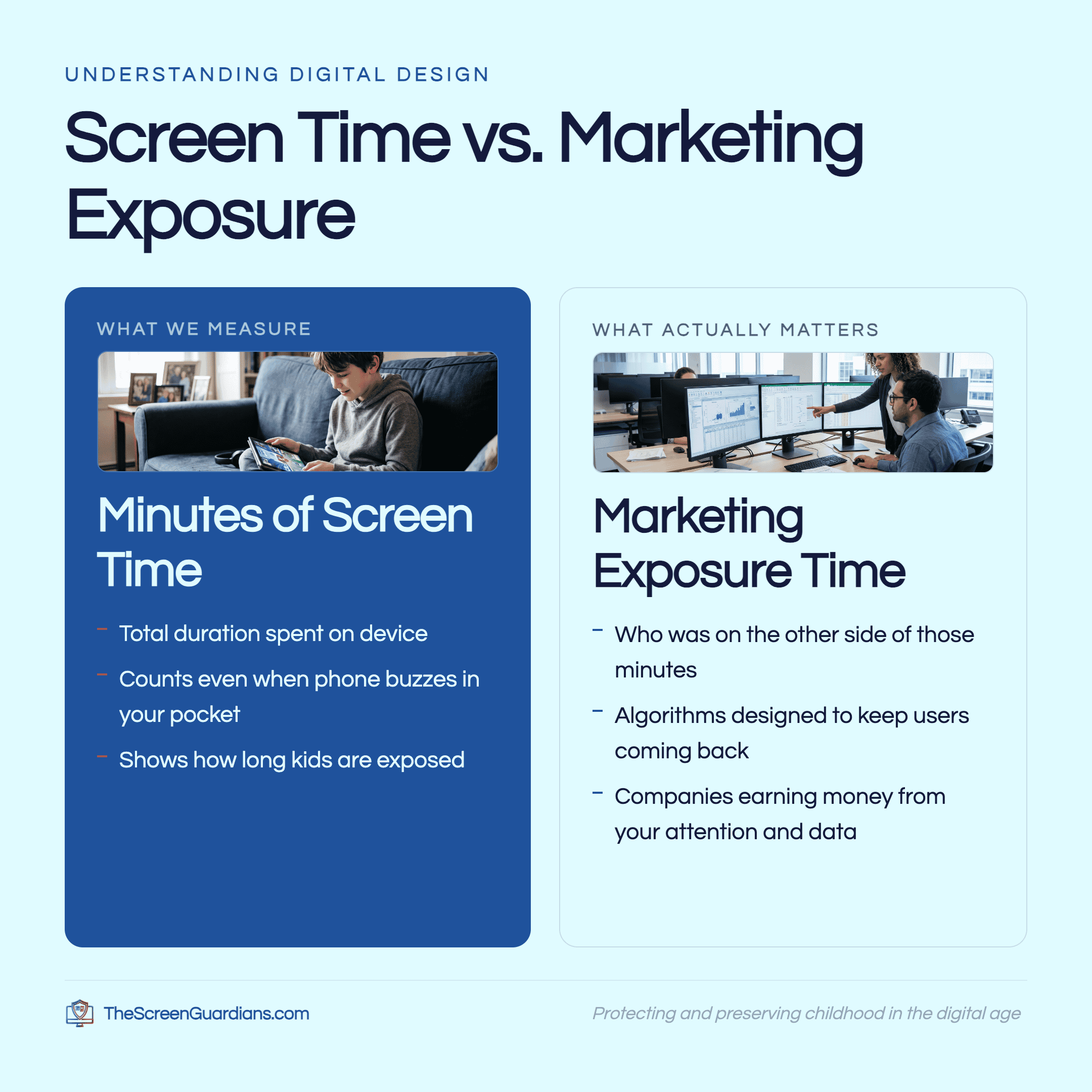
Screen time isn’t the right measure. Marketing exposure time is.
Table of Contents
The internet is a marketing engine, and we’re the fuel
The internet wasn’t built to sell us things. But the consumer internet we use every day has become a marketing engine. And every engine needs fuel. Our time and attention are the fuel.
So Ben asks a better question than “How much screen time?”
“How much time do I spend away from marketing?”
Why kids screen time misses what matters
Once you see it this way, a lot starts to make sense:
- Why kids can’t put it down. Algorithms are the natural result of marketing moving into a digital world. They’re designed to keep us coming back. That’s why we teach kids it isn’t a willpower problem. It’s not your fault. It’s by design.
- Why “free” is never free. Ben’s favorite question for a room full of teenagers: “Why is Instagram free?” Companies that earn their money from ads need our attention and our data. Games that make money when kids buy in-game currency need kids to keep playing.
- Why a phone in your pocket still counts. It buzzes and pulls at us even when the screen is off. Having it with you counts as exposure time, not just looking at it.
Counting kids screen time in minutes tells you how long. Marketing exposure time tells you who was on the other side of those minutes, and what they wanted.
The one thing every parent should know: follow the incentives
When I asked Ben for the single most important thing parents should understand, he didn’t hesitate: incentives.
Ask what the company behind the app or game actually wants. If what it wants is different from what you want for your child, you know what you’re dealing with.
Then ask one more question about any platform: Can strangers contact my child? If the answer is yes, find something else.
Schools can ask the same two questions about every app on a student device. It’s one of the simplest platform checks there is, and it works at home and in the classroom.
Parental controls aren’t “set it and forget it”
Turning off chat is a great step. But Ben warned that some platforms switch their parental controls off automatically once a child reaches a certain age, often 13 or 16. His standard is that anything built for kids should respect parental authority. The parent decides, not the company.
So check your settings again after updates. And keep talking with your child.
Where AI fits
AI is becoming part of the marketing machine too, and it’s something new. Ben explained that its flaws don’t show up as error messages. They show up as confident, human-sounding answers that go straight into our heads. Kids especially don’t naturally recognize that it isn’t a real person. (We dug into this from the school side in AI chatbots and student mental health.)
That’s why Ben is cautious about kids using AI. If they use it at all, his rule is simple: always with an adult sitting right beside them.
Answer machine or thinking partner?
For adults, though, he sees real value when it’s used the right way:
Wrong way: an answer machine. “What’s the answer?”
Right way: a thinking partner. “Here’s what I’m thinking. What am I missing?”
Don’t ask AI to write the answer for you. Ask it to help you see the gaps:
- What am I not thinking about?
- What questions should I be asking?
- Where would someone push back on this idea?
Used that way, it makes you think more instead of less. Ben’s test: can you explain what you learned to a friend without the AI?
Give your kids a free pass
Kids learn through mistakes, but online those mistakes can carry big consequences. Ben suggests that every internet-connected device come with a free pass: “People will try to trick you. If it happens, it’s not your fault. Tell me, and I’ll help you.”
In our family, we use a code word. It starts small (“I took my sister’s candy”) and grows into “I’m uncomfortable, come get me, no questions asked.” The goal is the same either way: your child comes to you instead of hiding.
Small steps to take back your attention
Ben was the first to admit he’s still practicing this himself. “This isn’t a you problem. It’s an us problem.” A few of his practices:
- Leave your phone by the door and go outside, for 1 minute or 30. Notice how you feel. Then notice how you feel 20 minutes after you pick it back up.
- Go to the store without your phone, and bring your kids. Watch for that moment of eye contact in aisle six.
- Clear out notifications in three levels: (1) turn off the junk alerts, (2) turn off social media and other marketing apps, (3) let only phone calls through, so your phone is just a phone again.
- Charge devices outside the bedroom.
- Try a no-connection day. In Ben’s house it’s Sunday, and it’s everyone’s favorite day.
As a former cardiac nurse, I see digital health the way I see heart health. It isn’t one good day. It’s a daily practice.
What this means for schools
Ben’s idea lands in classrooms too. A phone policy turns the marketing engine off for the school day, and that work matters. But it doesn’t teach a single student why the engine exists or how it was built to hold their attention.
That’s the other half, and it’s what The Screen Guardians teaches. In our K–12 digital health and safety program, students learn how algorithms work in the digital bubble module, one short lesson a week taught by their own teachers. A Parent Companion after every lesson carries the same language home. The question we give every student is the one Ben is really asking: Am I using technology intentionally, or is technology using me?
Restriction is a pause button. Education is the solution.
It’s never too late
“Wherever you are right now is okay… It’s not your fault. It’s the nature of the current reality we live in. And it’s okay for it to be hard.”
Take one small step. If you slip, try again tomorrow. Your kids are watching, and when they see you do it, they learn they can too.
Start where you are.
Listen to the full episode
There’s so much more in this two-hour conversation than fits here, including how Ben introduced his 11-year-old to AI safely, how AI is showing up in schools without parents being asked, and why early-adopter technology is a hard fit for developing brains.
Listen to “The Cost of Free” on Spotify, or find every episode on The Screen Guardians Podcast page.
Learn more from Ben at familyitguy.com. Search “AI” to find his guide on AI in schools.
Frequently asked questions
Is kids screen time still worth tracking?
Yes, but it’s only part of the picture. Two hours of drawing on a tablet and two hours on an ad-supported feed aren’t the same. Ben suggests also asking how much of that time your child spent exposed to marketing, and how much time they spent away from it.
What is marketing exposure time?
It’s the time a child spends in apps, games, and feeds that make money from their attention, data, or in-app purchases. Ben counts a phone in your pocket too, because notifications keep pulling at us even when the screen is off.
How can I tell if an app is safe for my child?
Follow the incentives. Ask what the company behind the app wants, and whether that matches what you want for your child. Then ask whether strangers can contact your child on it. If they can, Ben’s advice is to find something else.
Should kids use AI tools?
Ben is cautious. If kids use AI at all, he recommends an adult sitting right beside them, because AI’s mistakes sound confident and human. Adults can get more from it by using it as a thinking partner instead of an answer machine
If you’re ready to learn more
Want this conversation in your school? The Screen Guardians is a K–12 digital health and safety program that teaches students, teachers, and parents together. See how The Screen Guardians works.
Want to go deeper at home? The Parent Portal is a calm, judgment-free place to find tools for the hard moments.
Education is the greatest form of protection.