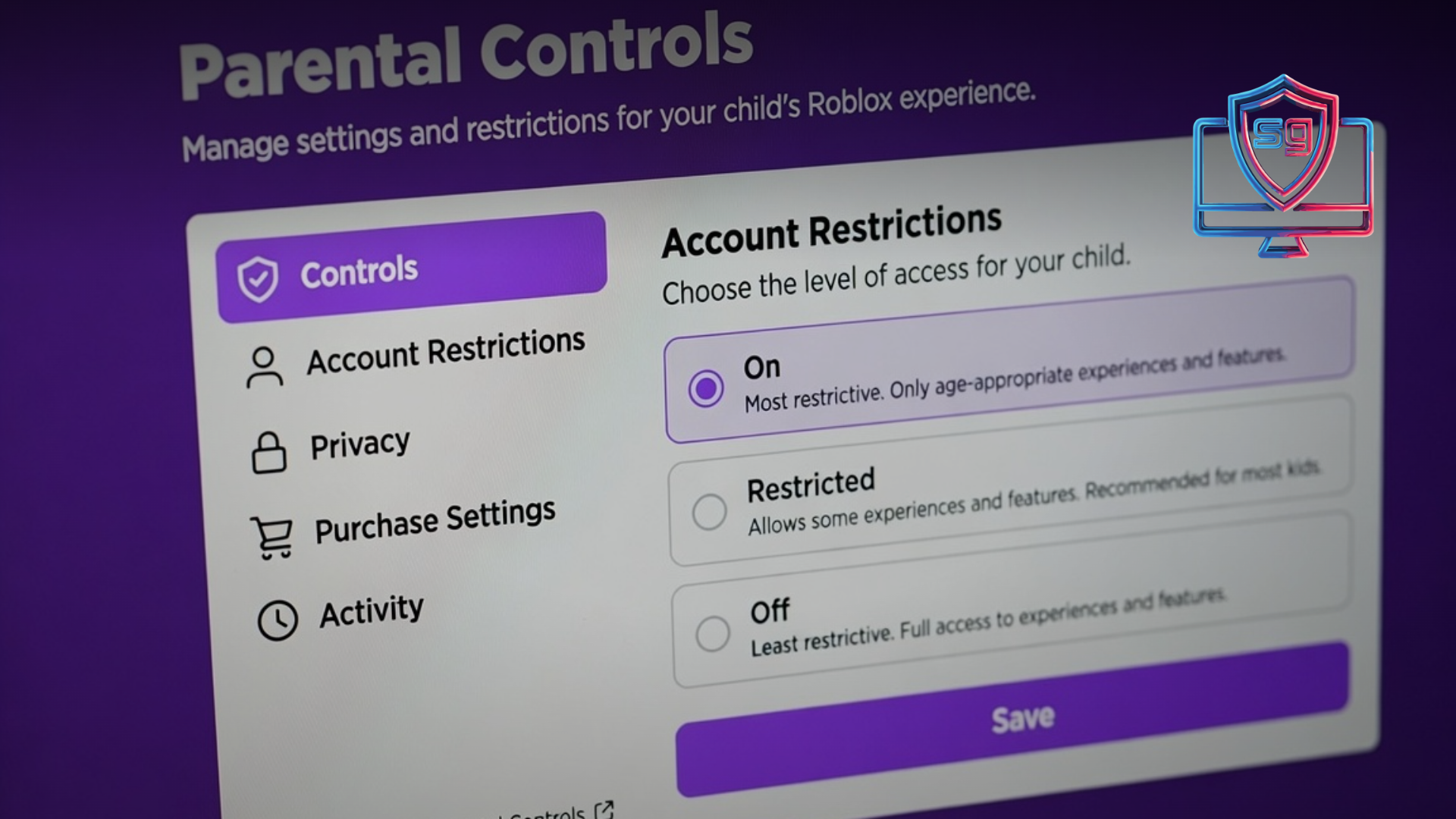
If your kid plays Roblox, you probably just got a notification that something changed—and if you’re like most parents, your first thought was, “Wait, what do I need to do now?” Take a breath. The new Roblox parental controls rolling out this summer are actually good news, and you don’t need to be a tech expert to use them. In the next few minutes, we’ll walk through exactly what changed, the five-minute setup worth doing today, and—more importantly—why the settings are only half the story. You’re not navigating this alone.
Table of Contents
What actually changed with Roblox parental controls
In early June 2026, Roblox introduced new age-based accounts and a wider set of family tools. Instead of one-size-fits-all access, kids now get an experience matched to their age.
Here’s the short version:
- Roblox Kids — for ages 5 to 8, with the most protective defaults.
- Roblox Select — for ages 9 to 15, with age-appropriate content and limits.
- Age checks and content ratings — so the games and experiences your child sees line up with their age.
- Expanded parental controls — more visibility and more say over who your child can talk to and what they can access.
The company also said it’s moving toward globally recognized content ratings, similar to the system used for video games and movies. This matters because it’s part of a much bigger shift: states like Louisiana, Texas, Utah, and California have passed laws pushing platforms to verify ages and build in real parental consent. The pressure is working, and the tools are catching up.
The 5-minute Roblox setup every parent should do
You don’t have to overhaul your whole evening. A few minutes now saves a lot of confusion later. Sit down with your child if you can—this is a connection moment, not a surveillance mission.
- Confirm your child’s account type. Make sure they’re on Roblox Kids or Roblox Select based on their real age, not an older birthday they may have entered to unlock more.
- Link a parent account. This gives you the dashboard where the real controls live.
- Review chat and contact settings. Decide who your child can message—friends only is a strong default for younger kids.
- Set spending limits. Robux purchases add up fast. Turn on approvals or caps.
- Talk through what they’re playing. Ask which games they love and why. You’ll learn more in two minutes of curiosity than two hours of monitoring.
That’s it. No judgment if you’ve never opened these menus before—most parents haven’t. Start where you are.
Why settings alone won’t protect your child
Here’s the part we care about most. Parental controls are a helpful starting point. They are not the finish line.
A locked-down account can still leave a child unprepared for the moment a stranger sends a friendly message, or a game nudges them toward “just one more” purchase, or a friend shares something that doesn’t sit right. Tools can filter content. They can’t teach judgment.
And kids’ brains are still under construction. The part that weighs risk and pauses before acting—the prefrontal cortex—won’t be fully developed until their mid-twenties. So when a game is engineered to keep them playing, logic goes out the window and impulse runs the show. That’s not a character flaw. That’s biology.
This is exactly why we believe in education over restriction. When kids understand why a platform is designed to hold their attention, something shifts. Shame goes down. Curiosity goes up. They stop seeing you as the rule-enforcer and start seeing the system for what it is.
Turn the new tools into a conversation
The next time you adjust a setting, narrate it out loud. “I’m turning on friends-only chat because people you don’t know can pretend to be someone they’re not.” You’re not just changing a toggle—you’re teaching a lifelong skill. A dysregulated or frustrated child doesn’t need more control. They need more connection.
If you want ready-made scripts for these conversations, our Parent Portal is full of calm, practical guidance for exactly these moments—no tech degree required.
What this means for schools and families together
Roblox isn’t just a home issue. Kids talk about it at lunch, trade game recommendations between classes, and bring those friendships and frictions right back into the classroom.
That’s why shared language between home and school matters so much. When teachers, parents, and kids are all working from the same understanding of healthy digital habits, confusion drops and trust grows. Children feel safer—and far more likely to ask for help when something goes wrong. You can see how this works in our K–12 program, which gives schools a structured, brain-science-based way to teach digital health alongside families.
For a broader look at how platforms are being pushed to protect kids, the nonprofit Common Sense Media tracks these changes and reviews popular apps and games for families.
Frequently Asked Questions
Q: What age is Roblox Kids vs. Roblox Select for?
A: Roblox Kids is designed for ages 5 to 8 with the most protective defaults, while Roblox Select is for ages 9 to 15 with age-appropriate content and limits. Make sure your child’s account matches their real age.
Q: Do the new Roblox parental controls make the platform completely safe?
A: No tool makes any platform completely safe. The new controls are a strong starting point, but kids still need guidance and ongoing conversations to build real judgment and digital resilience.
Q: How do I set up Roblox parental controls?
A: Confirm your child’s account type, link a parent account, review chat and contact settings, set spending limits, and—most importantly—talk with your child about the games they play. It takes about five minutes.
Q: My child entered a fake older birthday. What now?
A: Correct the account to reflect their real age so the right protections apply, and use it as a calm teaching moment about why age-based settings exist—not a reason for punishment.
The bottom line
The new Roblox parental controls are a genuine step forward, and the five-minute setup is absolutely worth doing today. But remember: the toggle protects the account, while the conversation protects the child. You don’t have to be perfect or know everything about gaming—you just have to stay curious and connected. That’s the real safeguard.
Want calm, research-grounded support for raising digitally healthy kids? Join our newsletter for practical tools and real talk—no fear, no judgment, just help. We’re walking this road with you, step by step.